
 Looking to hire us to help with your sales and business technology needs?
Please complete our contact form or book an appointment to get started.
FAQ
What now?
- To kick things off, we simply hop on a quick, zero-pressure exploratory call. We talk through what’s going on, what sucks, and what you’re hoping to improve.
- I’m simply here to provide clarity and solutions. This initial call is really just a chance to see if we dig each other AND to determine if my services line up with what you’re trying to accomplish.
- From there, we decide together how to move forward based on how much structure you want and how hectic things are on your end.
- Option 1: Scoping + Statement of Work
- If you want tighter budgets, clearer expectations, and defined responsibilities, we slow down briefly and scope things out properly.
- This results in a Statement of Work that outlines scope, priorities, assumptions, and how we’ll execute.
- This is ideal when planning is possible and alignment upfront matters.
- Option 2: Dive In and Get Our Friggin’ Hands Dirty
- If things are moving fast, messy, or planning feels impossible right now, we can jump straight in on a bill-as-we-go on a time-and-materials basis.
- You tell me what needs attention, I work through it, and you’re billed for the time spent moving things forward.
- This works well when reality is changing faster than a plan ever could.
- Do keep in mind, this option does leave you at a bit of a disadvantage because other projects that are scoped may take precedence and your expected costs/timelines won’t be nearly as dialed in. But sometimes that’s necessary in the beginning.
- Staying in the Loop with
 Nexus
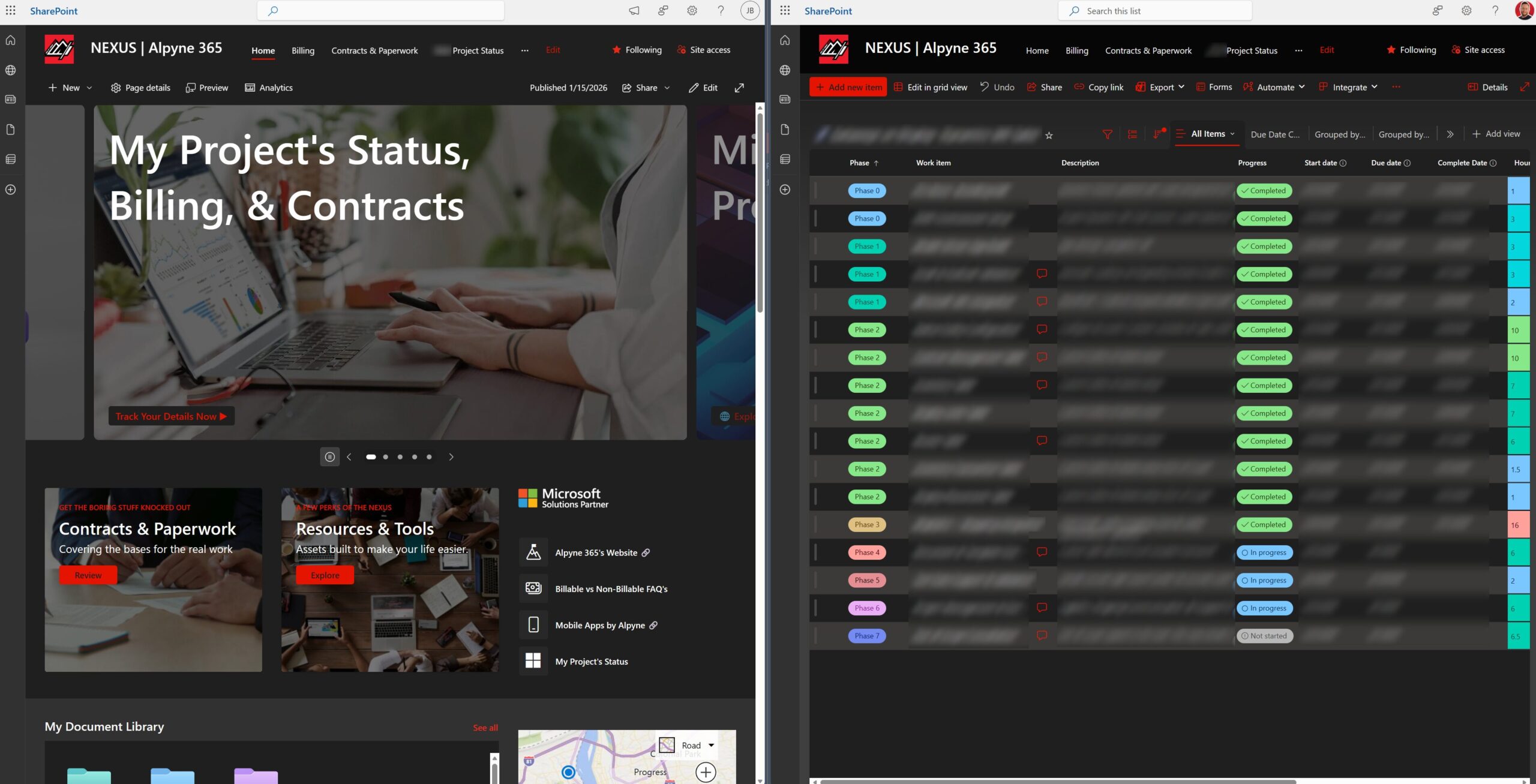
Nexus - Once we’re working together, you get access to your Nexus portal.
- Nexus gives you 24/7 visibility into project status, progress, billing, and documentation.
- You’ll also receive automated weekly updates so you always know what’s been worked on and what’s next.
- It’s all about transparency and making your life easier, not wondering what’s diabolically happening behind the scenes.
Rate and Billing
- After an initial, no-cost exploratory meeting where we establish that we both align and decide to move forward, consulting with Alpyne starts at $215 USD per hour with a 1 hour minimum purchase required for new customers.
- I accept payments by Check & ACH payments. By default, clients are Net 14, but I can be flexible with invoice timing, in the event you have specific policies in place.
- Estimates can be provided upfront, if you provide a clearly defined scope of work.
- A 1-hour appointment may be required to discuss larger/more complex projects.
- Any work performed outside of normal business hours or on holidays will be billed at a higher rate.
- Hours can be pre-purchased upon request or when required by a project.
- An account is required to pre-purchase hours. To set up your account we will request billing information, then an invoice will be generated and sent for the estimated hours we discussed. That time will be credited to your account upon receipt of payment.
- When you purchase a block of hours, those hours are credited to your account for use during our regularly scheduled times.
- Unused hours expire 1 year from the date of purchase.
Billable vs. Not Billable FAQ
- Are quick questions billable?
- No.
- If it is something small, like a fast clarification, a brief check, or a quick pointer in the right direction, I do not bill for that.
- I want communication to feel easy and supportive, not transactional.
- What counts as billable time?
- If it requires me to think, design, solve, build, fix, or move the project forward, it is billable.
- If it is quick, directional, or administrative, it is not.
- Examples of billable work:
- Deep dives into your processes
- Fixing issues
- Configuring or adjusting systems
- Scoping work or providing a roadmap
- Reviewing documents
- Training/consulting sessions
- Any hands-on work inside your systems
- Responding to lengthy emails asking for feedback
- Examples of non-billable work:
- Quick clarifications
- Fast replies such as “yes, that looks right”
- Orientation questions
- High-level direction
- A quick tour of Nexus
- Why do you bill for meetings and work sessions?
- Because this is where real work happens.
- If we are making decisions, reviewing processes, troubleshooting, designing, or moving the project forward, that time is project work and it is billed as part of the engagement.
- My goal is always to be efficient and deliver value, not to stretch time or overcomplicate things.
- Why do you bill for data cleanup/formatting?
- Because this part is often a nightmare on my end. PDF’s, random spreadsheets, crayon drawings… you know what you’re dealing with. I make light of this but truly, I urge folks to repeat the mantra: Clean data in, clean data out.
- Converting PDF’s and desperate spreadsheets or data sources into usable data often takes an immense amount of time. I highly encourage you to delegate that to your team.
- Why is scoping work billable?
- Scoping is analysis, not guessing.
- To create an accurate plan and prevent surprises, I need to evaluate your systems, processes, data, and requirements.
- That takes time and expertise, so it is included as billable discovery work.
- Are calls automatically billable?
- Not automatically.
- If the call is light, high-level, or simply aligns communication, it usually stays non-billable.
- If the call turns into design work, troubleshooting, planning, or anything that directly advances the project, it becomes billable.
- If we start entering billable territory, I will tell you before we continue. No surprise invoices.
- Do we have visibility into our project status?
- Yes. You receive automated status updates every week by email.
- You also have 24/7 access to your project status and documentation inside your Nexus portal.
- Nexus tours are free. If you want a walkthrough or need help understanding any part of it, I will guide you at no charge.
- Can we avoid or reduce our billable time?
- Yes.
- Come prepared to meetings, gather internal decisions beforehand, and consolidate questions when possible.
- The clearer we stay, the less time we need, and the lower your cost.
- Are you flexible?
- Yes.
- If something feels borderline or you are unsure whether it counts as billable, just ask.
- I am reasonable and I look at every situation in context, not by the minute.
- Why be so transparent about billing?
- I know I can’t stand when this stuff is buried, so why do that to you?
- Most folks have a mix of legacy systems, informal processes, and unique challenges. That is normal and there’s a lot involved navigating them.
- Clear expectations make it easier to collaborate, avoid misunderstandings, and build trust.
- Transparency protects both sides and keeps the work predictable and professional.
- In short
- I am here to help, I want your project to succeed, and I will always be fair.
- Billable time is simply the time that contributes to the real work getting done.
- You will always have the capability to know what is happening and what progress is being made.
What tools do you use to coordinate meetings?
- While in-person meetings are generally preferred, quick check-ins or scheduling needs may dictate the need for virtual meetings.
 Microsoft Teams is used to collaborate and communicate during virtual meetings.
- Webcams are optional and if a mic is not available on your device, you may use a phone to call into the meeting. You’ll receive this information while booking the meeting.
- We prefer not to use other meeting clients or remote connection software.
What if I want to send you documentation or screenshots before our appointment?
- After we respond to your initial request with a booking link, you may send us whatever information you think will help during your appointment, if needed.
- Any and all information sent prior to an appointment will only be reviewed at the our discretion. We are not required to review any documentation prior to a meeting as that can be considered billable time.
- DO NOT send any passwords or sensitive information via email or this contact form. We will either request that information during your meeting or coordinate a secure way to send the information otherwise.
Warranty Information
- Due to the nature of the work that we perform, there is no warranty on hourly work and is provided “as-is”.
- Each hour that we work is billable, regardless of the outcome of said work.
- While we will provide estimates and recommendations on the level of effort required to implement a solution or fix an issue, it is up to our clients to let us know if there is a cap on the number of hours we spend per engagement.
CONTACT US
Aready a customer? Manage your projects, billing, & contracts on our NEXUS customer portal
 TL;DR Copilot Summary
The page is intended to help people understand what to expect when working with Alpyne 365, including how projects are structured, billed, and tracked, as well as the transparency and communication clients can expect throughout the process.
Note: We take security seriously. If there is any need to communicate any sensitive data or passwords with us, please do not send such information via email or through our contact form.