
 Dynamics 365 Sales for Equipment Dealers: A Full Sales System in Two Days
No ERP required. No overcomplicated setup. Just a system that works.
A buddy of mine gave me an idea, so I spun up a fresh sandbox and got to work. The goal was straightforward: show how well Dynamics 365 Sales handles the full equipment dealer workflow without touching Field Service or a big ERP platform.
What came together in two days is a unified system covering inventory, quoting, service orders, and invoicing. Everything in one place, no jumping between tools, no fighting data that lives in three different spots. If you are an equipment dealer or auctioneer tired of your current setup, here is what this actually looks like end to end.
 TL;DR Copilot Summary
Dynamics 365 Sales can run a complete equipment dealer operation out of the box with light customization. Products, inventory, quoting, orders, service, and invoicing all live in one system with no ERP or full Field Service module required.
The demo covers the full sales cycle from opportunity to paid invoice, plus a lightweight service order module that auto-generates invoices on job completion.
Most equipment dealers are stuck in the same spot. Spreadsheets for inventory. A free CRM that almost does what they need. Maybe a legacy system that costs a fortune and requires a consultant on speed dial just to change a field. The thought of moving to an ERP feels like signing up for a two-year project and a bill nobody wants to look at.
Dynamics 365 Sales is not an ERP. It is a CRM, and a highly flexible one. For equipment dealers and auctioneers who do not need a full-blown dispatch and routing operation, it covers a surprising amount of ground. Here is what I built out and how it flows.
Everything shown here was built in roughly two days. The product table was customized for equipment-specific fields. Two custom tables were added for service orders and service order items. Everything else, the opportunity, quote, order, and invoice pipeline, is largely out of the box with layout and form customizations. The limit in Dynamics is almost always imagination, not the platform.
The equipment product record
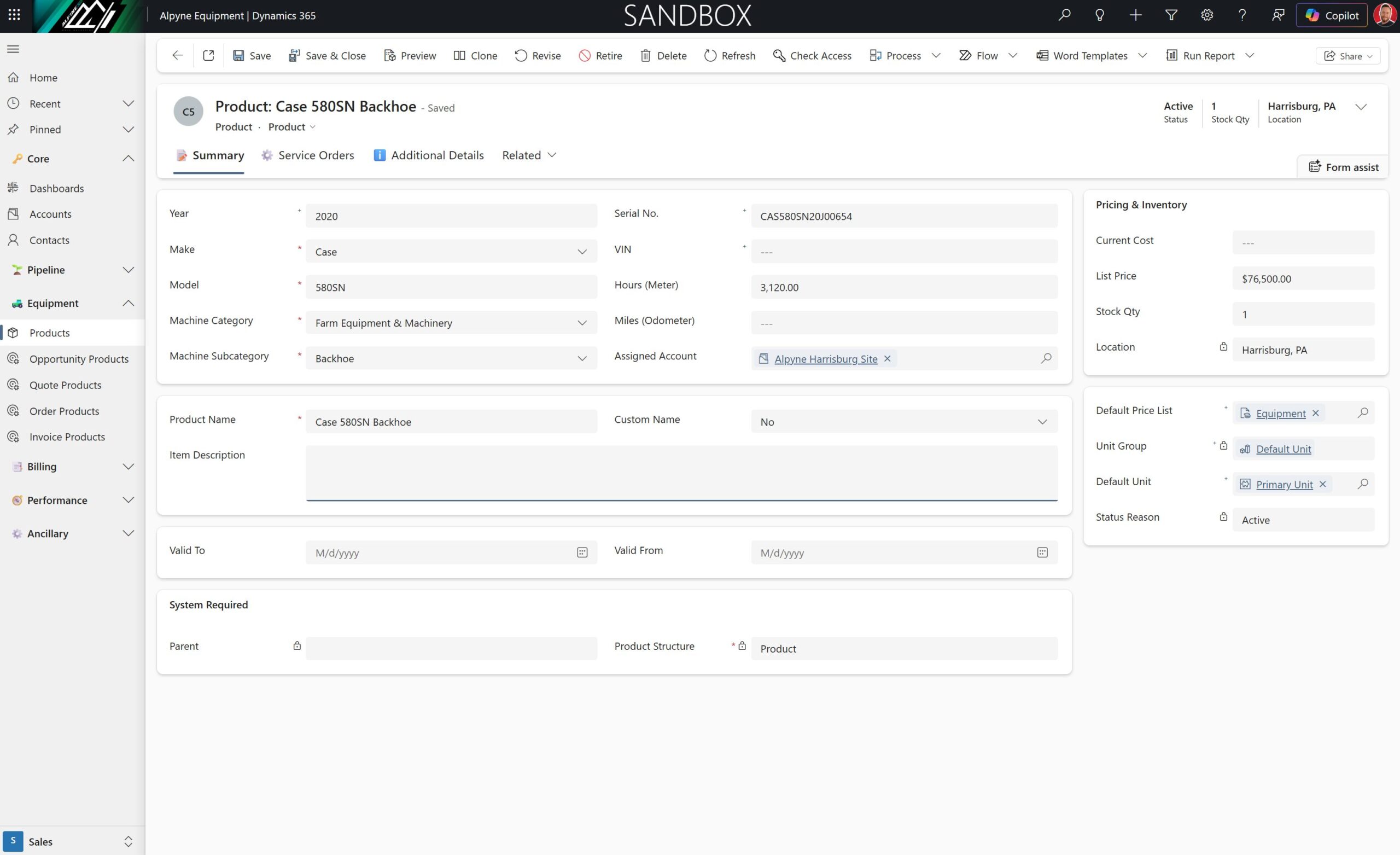
The foundation of the whole system is a customized product record built around what equipment reps and techs actually need to see fast. Year, make, model, category, subcategory, serial number, VIN, hours or miles, assigned account, warehouse, cost, list price, stock quantity, and location pulled from the assigned account. The product name itself is dynamically generated from those fields, so it stays consistent without anyone having to type it manually.
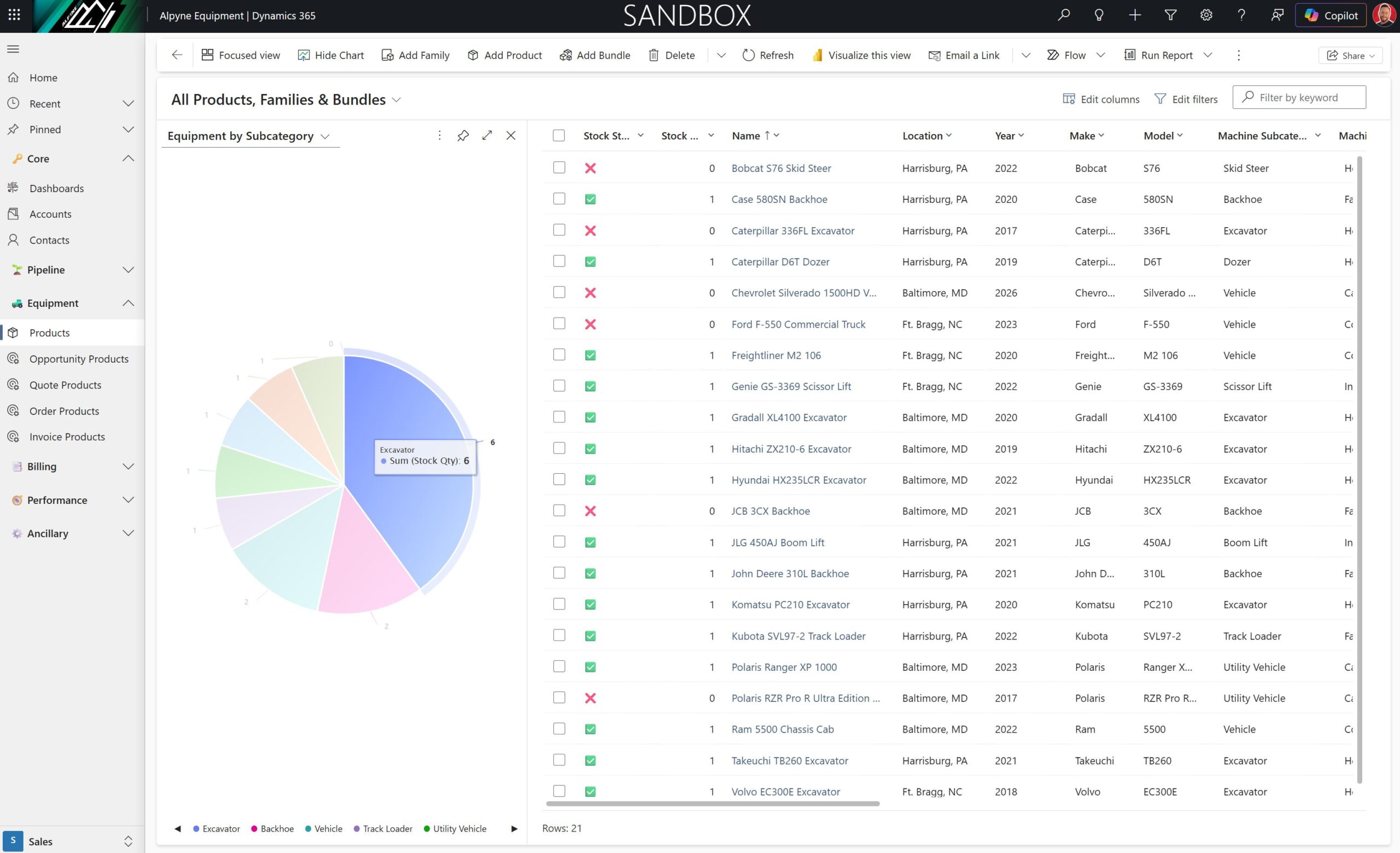
The inventory view is set up for quick visual scanning. Color indicators show at a glance what is in stock and what is not. From there, a rep can filter by category, location, make, or subcategory with a single click. Charts on the dashboard break down inventory by all of those dimensions so you can see where you stand in seconds, not after running a report.
The sales pipeline: opportunity to invoice
The pipeline follows the standard D365 flow: opportunity, quote, order, invoice. What makes it work for equipment dealers is how the product data moves through each stage with you.
On an opportunity, you select a price list and add the equipment you think the customer actually needs. The system calculates estimated revenue automatically from those products. When the customer is ready for a formal quote, one click creates it and pulls all the products over. No re-entry. From there, discounts, manual price adjustments, and expiration dates are all handled on the quote form directly.
Quotes that look the part
D365 supports Word-based document templates, and the out-of-the-box quote export is not something you want to hand a customer. The customized version in this demo pulls all the relevant fields into a clean, professional PDF: customer name, quote number, date, expiration date, product descriptions, serial numbers or VINs, hours or miles, quantities, and totals. Dynamic fields update automatically as the quote changes.
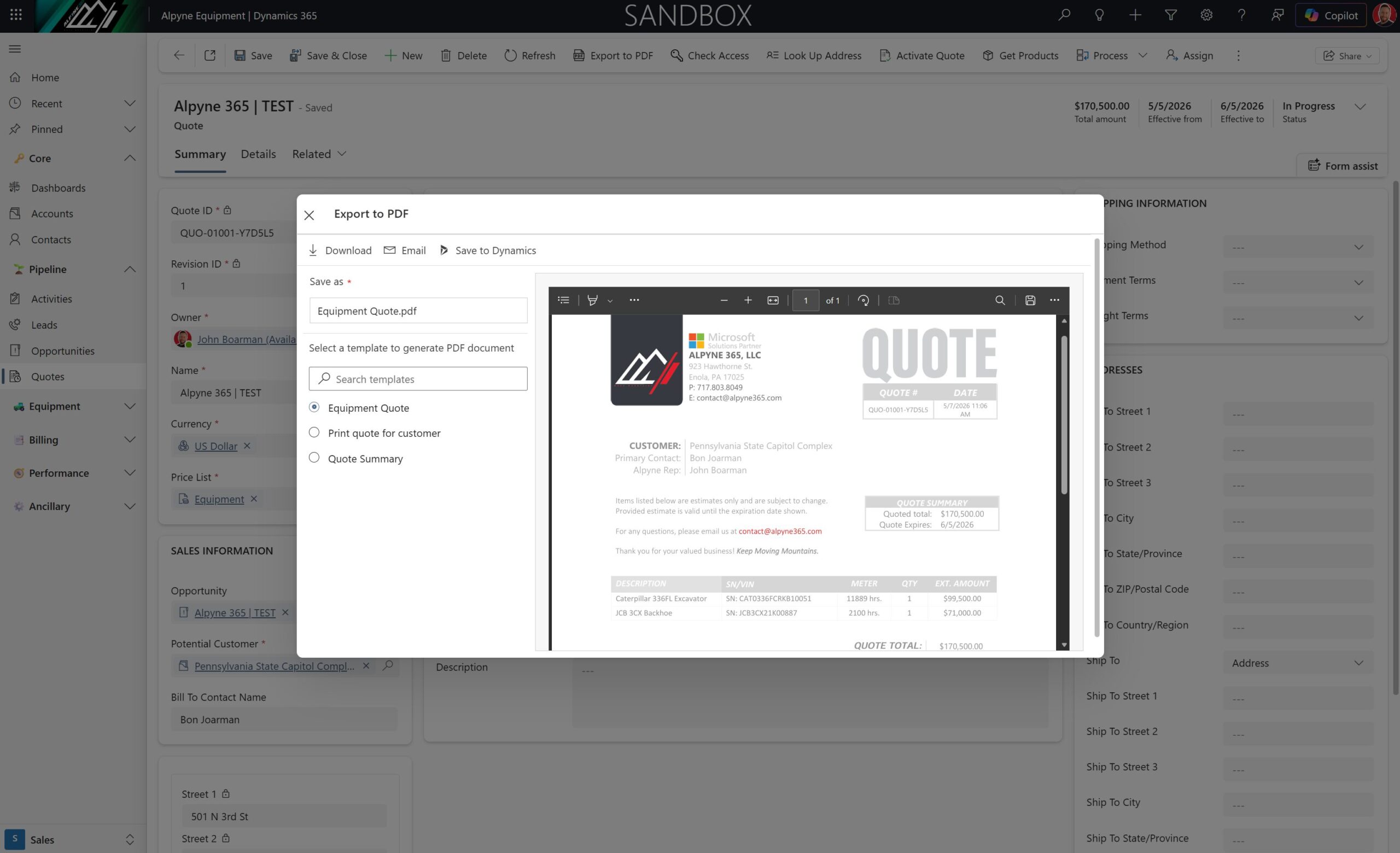
Beyond a simple price sheet, D365 also supports full proposal documents. A Statement of Work template with a cover page, scope, timeline, policies, and terms can be exported from the same record. That document connects with tools like Adobe Sign or DocuSign, so the signing process runs right alongside the quoting process. No printing, no emailing PDFs back and forth.
Quote revisions are tracked automatically. Each revision increments a revision ID so version history is always there if you need it. Once the customer signs off, the quote converts to an order in a single step.
Orders and inventory
When an order is created, inventory is automatically committed. The product record reflects that immediately. No manual stock adjustments required. If a deal falls through or a machine needs to be re-added to available inventory, an admin can handle that directly on the product record. The system stays accurate without relying on anyone to remember to update a spreadsheet.
Service orders: light maintenance without Field Service
Dynamics has a full Field Service module built for dispatch-heavy operations with technicians on the road, routes, and complex scheduling. Most smaller equipment dealers do not need that. What they need is a way to track in-house maintenance jobs, log parts and labor, and get an invoice out the door when the work is done.
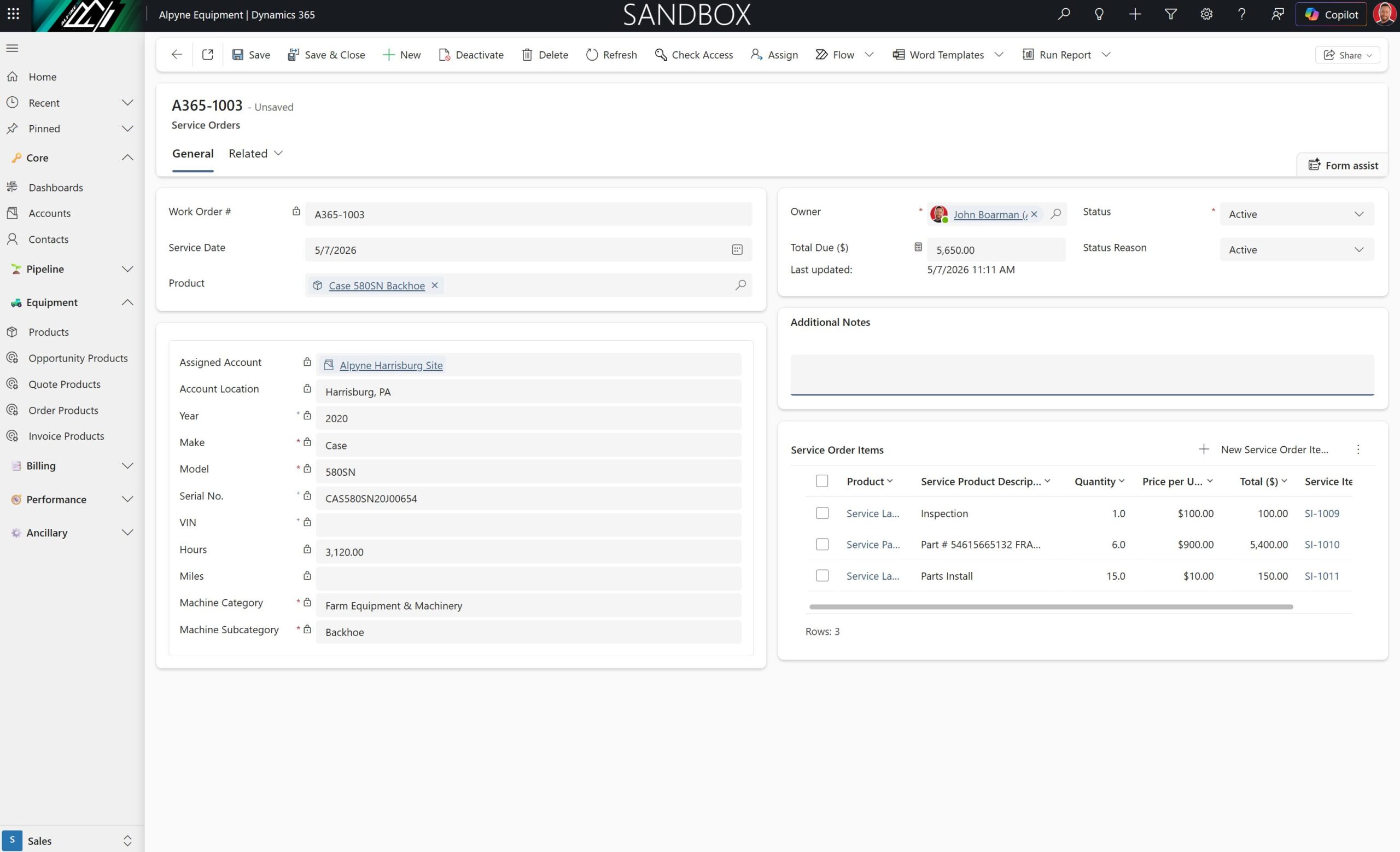
The custom service orders table in this demo does exactly that. Open a service order from a product record and the machine details populate automatically from the product: make, model, year, serial number, assigned account, location. Add service order items for labor and parts, each with their own quantities and prices. A rollup field calculates the total automatically across all line items.
When a service order is marked complete, an invoice is created automatically. The job is done, the bill is ready, and nothing fell through the cracks. That is one less manual step for the person running the operation.
What this looks like in practice
Tracking products across the entire lifecycle
Because products are tied to every stage of the pipeline, you can filter by VIN or serial number and see exactly where a machine has been: which opportunity it was on, which quote, which order, which invoice. That kind of traceability is genuinely useful when a customer calls asking about a machine they bought two years ago, or when you need to verify what was sold and when.
The service orders tab on the product record shows active jobs tied to that machine. Once a job closes, it clears. Clean record, no guessing whether something is still being worked on.
Getting your existing inventory in
If you have hundreds of machines sitting in a spreadsheet right now, D365 handles bulk imports from Excel. Download the template from the system, format your data to match, and import. Field mapping is handled automatically when you use the template. For a dealer with a real inventory count, this is a fast path to getting everything into the system without manual entry.
The bottom line
You do not need a heavy ERP or a full Field Service implementation to run a tight equipment operation in Dynamics. The Sales module handles inventory, quoting, orders, service, and invoicing in one place. Your team works from the same system, the same data, and the same pipeline. That is the practical middle ground most dealers actually need.
Bonus: How this scales if your operation is more complex
Everything shown here is the light version. It is built for dealers who want one system that handles the sales and service cycle without overengineering it. But Dynamics scales with you.
If you grow into multiple locations with technicians dispatched to customer sites, Dynamics Field Service plugs into the same platform. Your accounts, contacts, products, and history carry over. You are not starting over, you are adding capability on top of what already exists.
If you need deeper reporting across inventory, revenue, and service data, Power BI connects directly to Dynamics and lets you build cross-table reports that your CRM view alone cannot produce. Want to see service order revenue by customer alongside deal revenue and inventory value? That is a Power BI report, not a feature request.
Search for “equipment dealer CRM” online and you will find vendors that market themselves as industry-specific solutions. Some of them are good. A lot of them are built on older platforms, supported overseas, and difficult to customize quickly when your business shifts. Dynamics is less industry-specific and more infinitely configurable. The right partner builds it to your exact operation. The wrong partner books you into meetings for six months and delivers something generic. Ask the right questions before you commit to anything.
The demo in the video above was built in two days. Not because it is a toy, but because Dynamics moves fast when you know what you are doing. If you want to see it live or talk through your current setup, reach out.
Want to see this for your operation?
I built this demo because a good friend sparked the idea and I wanted to see how far the Sales module could go for this industry without touching Field Service or ERP territory. Turns out, pretty far.
Alpyne 365 is a Microsoft Partner focused on Dynamics 365 and Microsoft 365 implementations for small and mid-size businesses. Equipment dealers, auctioneers, distributors, service businesses. If your current tools are almost doing the job but not quite, that gap is usually fixable without a massive investment.
If you want a live walkthrough of this demo or want to talk about what your operation actually needs, drop me a line. No pitch, no pressure. Just a straight conversation about what is going on and whether Dynamics is the right fit.